Friday, January 13, 2012

WALTR - Introduction

Project WALTR (Wireless, Apple II, Logo, Turtle, Robot)

From my early computing days I remember wanting a computer controlled robot (either a turtle robot or a robotic arm). Robot control using home computers started becoming popular in the 1980s however not popular enough in my part of the world as the only ones I ever got to see were the ones in magazines. They were very expensive and since we were unable to afford an original Apple II the chances of getting a robot was even more remote. Over the past few years I have been getting back into the Apple II world and my desire to obtain or build a turtle robot has grown.

I considered purchasing an original turtle robot but they are still very expensive due to their collective appeal. If you can find one they are most likely incomplete and/or require restoration. Rebuilding one from scratch using the plans from magazines also sounded like a huge job. With today's cheap robotic toys I wondered if anything existed that could easily be retrofitted and made to work like an old robot. When I came across the Parallax Scribbler 2 (S2) I knew it would be a great fit.

I had other Apple II projects on the go but Peter's Logo presentations at the last KansasFest resparked my interest and I was pleasantly surprised that I was not the only one looking in this direction and wanting to find a solution.

When looking at the S2 robot it looked like lots of fun even without having it hooked up to the Apple II but I think I have learnt more in a shorter amount of time by having a defined goal. The bonus has been having other fun gadgets to play with along the way. To make the S2 into a Logo controlled turtle robot it was going to need a few modifications. The main one being a pen lifter. The horn, lights and touch sensors could be emulated by using the existing S2 objects. Finally, since I am not trying to build an authentic replica, in today's world a turtle robot would not be complete without having a wireless interface.


Serial wireless (Bluetooth) connection for the Parallax Scribbler 2 Robot.

When I first looked into making the S2 wireless I concentrated on finding something that would plug into the S2's RS232 port (like the IPRE Fluke). Basically I wanted to swap the programming cable with a seamless wireless alternative. The Bluetooth RS232 modules looked rather expensive so I looked around and found the less expensive XBee modules and Bluetooth TTL modules. My preference was to get Bluetooth over XBee so that one day I could control the robot using my mobile phone. Bluetooth TTL modules use the RS232 protocol but at the hardware layer they use TTL signals. They cannot be plugged straight into an RS232 port. TTL and RS232 use different voltage levels (TTL: Off = 0V, On = +5V. RS232: Off is between -3V and -25V, On is between +3V and +25V). However they can be plugged into the S2 hacker port. The disadvantage was that the S2 could not be programmed wirelessly but it had several advantages. It was by far the cheaper option, it was hidden away inside the S2 case and it bypassed the RS232 hardware layer so potentially could be run at higher speeds.

I didn't know much about Bluetooth communication before I started this project and the funny thing is that I still don't. That is the beauty of these modules. The setup is miles easier than trying to pair a Bluetooth device with a computer. The default settings are adequate for a serial connection and the only setting that I needed to make was to the working mode. By default the modules come preprogrammed as slaves so I needed to change one of them into a master. This was achieved by connecting the module up to the "USB to TTL converter", setting it into AT Command mode and sending it "AT+ROLE=1" using a terminal program (I used HyperTerminal). That was the PC side done.

The type of Bluetooth TTL modules that I purchased needed to work with five volt signals and the settings needed to be easily changed in case I did wish to learn more about Bluetooth and reprogram them so that they could talk with other Bluetooth devices. The connection of the slave module to the S2's hacker port was straight forward. To test the S2, via the serial cable and wirelessly, I used the demo code titled S2_test.spin. It's a great utility that allows you to test all the objects of the S2 including the motors. Only one line needs to be changed in S2_test.spin to make it work wirelessly ie "sio.start(s2#RX, s2#TX, 0, 19200)" to "sio.Start(s2#P0, s2#P1, 0, 9600)".

I was very impressed with how quickly I had the S2 moving about. The support for the S2 is amazing. A lot of low level functions have already been written for the S2 objects (speaker, motors, sensors, LEDs) so all one has to do is to include these and call the higher level functions. The serial protocol has also been written and there are plenty of good examples detailing how to interface with other objects like servos. I managed to get the S2 up and running in no time and my simple serial control test only takes around twenty lines of code (not counting the included libraries).

Parts
2 x 5V Bluetooth module ("Mini Classical Serial Bluetooth Module" from eBay) - WARNING, sleep mode, see next blog entry.
1 x USB to TTL converter ("PC USB to RS232 RS485 UART TTL Signal Converter New" from eBay)


Apple II Control

Once I had the control of the S2 down pat using the PC I moved over to getting it working with the IIGS. I had an adapter (IIGS Serial Mini-DIN 8-pin to RS232 DE-9) already made up from when I was using ADTPro to transfer disk images over to the IIGS. I made the adapter so that I could connect up the IIGS to serial devices that have the DE-9 connection.

The Bluetooth TTL module could not be plugged straight into the RS232 port. An RS232 to TTL converter was sourced to do the job. This converter and the Bluetooth module require an external five volt supply but an RS232 port can not supply power (not without software and hardware modifications) so currently I have it externally connected but I have plans to source the power from the IIGS. Once the hardware was setup all I had to do was use a terminal program (I used ZLink because it was the first one that I found lying around) to send the commands through.

There are a number of remaining sections to get working including the pen lifter and the interface with the Logo language. There are a few implementations of the pen lifter already constructed for the S2 so I have some examples to work with. The first lot of turtle robots for the Apple II used parallel cards for communication however I will be trying to get my robot talking via a serial connection. Finding a serial protocol that has already been implemented in an Apple II Logo program is proving to be a challenge.

Parts
1 x RS232 to TTL converter ("RS232 MAX232 COM Serial to TTL Converter Module Board" from eBay)


Wednesday, June 8, 2011

Power Supply - Conversion

Being without a power supply got me searching for alternate power solutions. The original 230V power supplies are quite hard to come by and fixing the existing aging ones is only going to get me so far. Even when I get around to fixing them how much longer are they really going to last? What I was after was a long term solution. I have seen several good examples of converting PC supplies or triple voltage supplies but these require a modification to make them output the -5V voltage. That is not a huge issue but it is more work than I had hoped for. Quad voltage power supplies are also available but they are wider than the IIGS power supply (which is long and thin) making them difficult to fit inside the IIGS. That was until now. While searching around I came across the SDS60. It's a quad voltage power supply but has a form factor that will allow it to fit inside a IIGS power supply case.

When I ordered the SDS60 I was informed that full production of these was not yet under way so I had to wait a few months for the next run. It was a long wait but well worth it. Once I had the unit it took less than an hour to do the conversion and have my IIGS up and running again. It was the easiest soldering job I have done in years. What more could I ask for? Quad voltage power supply that is small enough to fit into a IIGS power supply case, a breeze to install and uses off the shelf parts. Perfect. It even has a wide input voltage range so you could easily transport it between countries.

Other power supply conversions :-
http://drewbiegs.wordpress.com/category/iigs-power-supply/
http://www.8bitsystem.com/slorble/?page_id=5
http://damntechnology.blogspot.com/2010/07/apple-iic-plus-240v-modification.html

Parts:
Made by XP Power http://www.xppower.com/orderPriceList2.php?seriesid=100114&groupid=100025&catuid=1&lang=EN
1. SDS60UQ02 Quad Voltage Power Supply
2. SDS60Q CONKIT Quad Voltage Power Supply Connection Kit

Australian distributors :-
1. http://www.amtex.com.au/power_pdf/SDS60.pdf (about AUD$150 delivered)
2. http://au.element14.com/jsp/search/productdetail.jsp?sku=1109927&CMP=LEC-XPPowerSC&ATT=1109927

Procedure:
In my junk box I had a 120V IIGS power supply which I was going to convert into a 230V supply one day. This will work very well as a base. I desoldered the PCB then just added the cable connectors. It was then only a matter of adding the standoffs and plugging in the SDS60.


Next step is to do some load tests and swap the standoffs from adhesive to screw type. This should lower the PCB and move the heat sink from sitting right up against the cable plug.


Update: 1st November 2012.

I was able to convert another Apple IIGS power supply very cheaply thanks to Mike who found a great source of these handy replacement modules.
It only cost me AUS$45 for two modules including postage to Australia.

Parts:
Jameco Part no. 2081721
Manufacturer EOS POWER USA INC.
Manufacturer no. LFMVLT80-4000
http://www.jameco.com/Jameco/Products/ProdDS/2081721.pdf

Mike's power supply conversion :-
http://www.cirruscomms.com.au/~mike_stephens/apple2/hardware/Vulcan_Power_Supply/index.html

Jason's power supply conversion :-
http://www.appleiioz.com/appleiioz/Apple_IIoz/Projects/Entries/2015/4/14_IIgs_110v_to_240v.html

Other interesting power supply write ups :-
http://forums.overclockers.com.au/showthread.php?p=14154884#post14154884
http://www.harrowalsh.de/Elektronik/APPLEBOX/powersupply_upgrading.htm

The procedure was pretty much the same as my other power supply conversion.


Tuesday, June 7, 2011

Power Supply - Failure

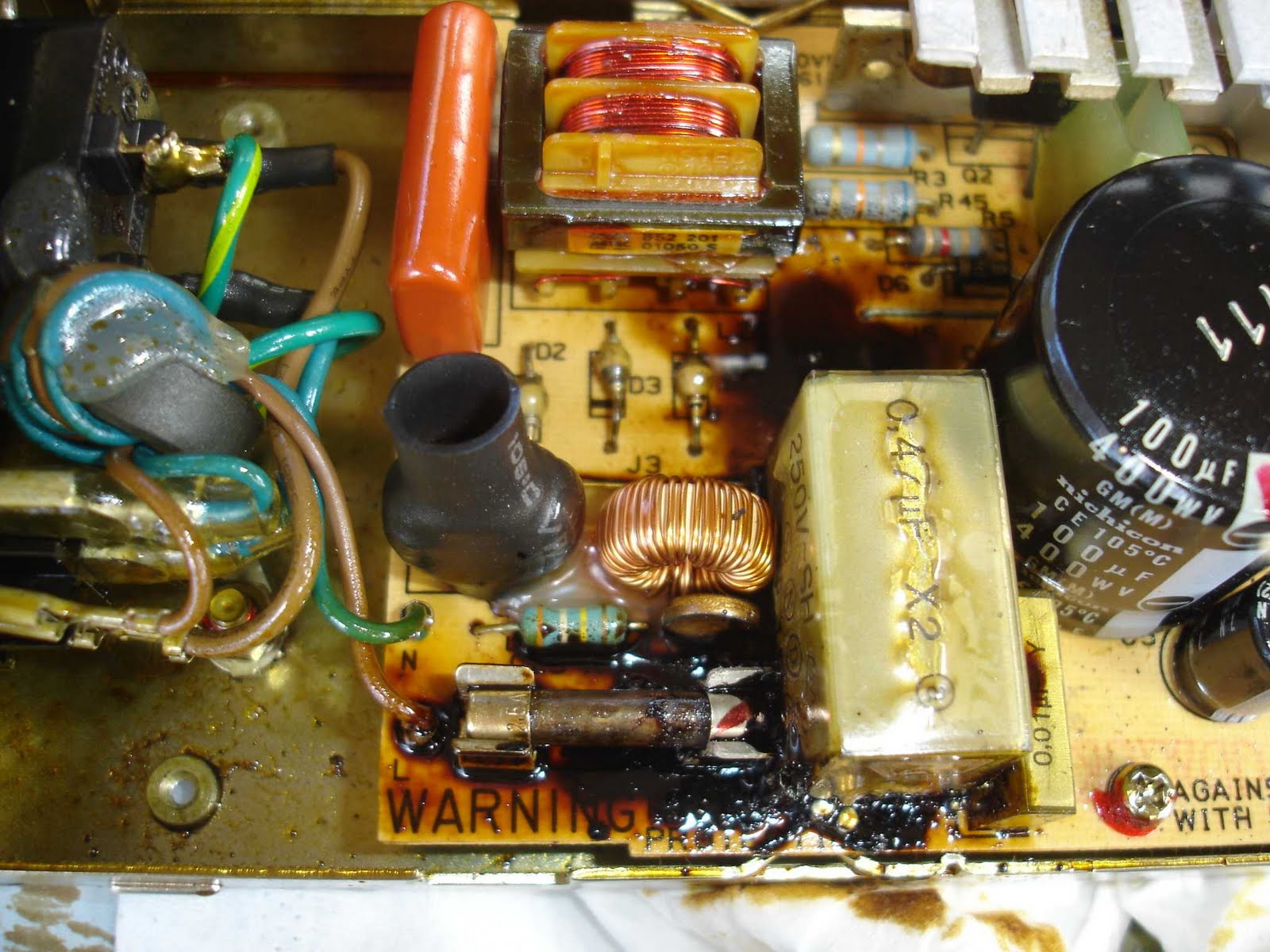
My IIGS has been running without a hitch for the past few years. I should have known better than to have left the twenty five year old machine running unattended while going outside to do some yard work. In the half hour that I was outside the power supply had failed and produced an awful mess. The room took weeks to air out. The peripheral cards, motherboard and monitor still smell of smoke and the case now has a nice brown burn mark on top. I took the power supply apart and just stood there for a while thinking, “What a mess! Am I every going to get the urge to clean that up?”


I thought I had done well by having a spare IIGS machine which I use for testing my electronic projects. When it came to turning it on all I got was the power light flicking on and off every half second or so. Frying two power supplies in one week didn’t impress me very much. I took this power supply apart and found that a large capacitor had blown it's top. However replacing the capacitor has not fixed the problem. The same symptom still persists. More load testing needed I think.


I intend on getting the power supplies fixed but sadly my trust in old hardware will never be the same again.

Update: 7th September 2017.


During OzKfest 2017 my machine let out the magic smoke. It would have been less to clean up if someone had pulled the power cord out, instead of watching and taking photos of the power supply spark and bellow out the smoke. But then again we managed to get this great photo. Turning off the power supply in this case did not work because this older unit had the line capacitor attached across the power plug and not to the supply circuit board.
 

Monday, June 14, 2010

CHED - Update

The serial output of the Apple's floppy disk drive produces a continuous bitstream where one bit is output every four microseconds. Generating this bitstream has been more difficult than I had expected. The difficulty comes from doing the hard drive reading, data conversion and output of the bitstream all at the same time using the existing resources. The output of the bitstream requires a fair chunk of the CPU time just by itself. I was unable to utilise the Atmega's USART as the start/stop bits can't be disabled so bit banging was the only other option available. Adding some extra processing power will be required.

Another shortfall is the amount of available memory. Presently there is only room for a few sectors to be buffered. By emulating a spinning disk, a given track's data is output again and again. This causes the hard drive to read the same sectors over and over again. Being able to buffer an entire track would save wear and tear on the hard drive. Extra memory will also allow me to write a better implementation of FAT.

Monday, April 27, 2009

Game Controller - Atari Joysticks

The Apple II computer was designed to use an analogue joystick (via the 16 pin game port then later a 9 pin port). This joystick uses two potentiometers to represent the position of the stick, one for the x-axis (8 bit analogue signal) and one of the y-axis (8 bit analogue signal). The joystick also contains two pushbuttons (digital signals). Many computers and game consoles from the 8 bit home computer era were designed to use digital joysticks instead ie these contain five digital signals, one signal for each of the four directions (Left, Right, Up and Down) plus one for the trigger button. The analogue joystick has a greater range of movement but at the expense of a fast response time. The digital and analogue joysticks are not compatible however it is possible to convert one to the other in a limited capacity. There are two main methods in converting an Atari style joystick on the Apple II computer and each method is only compatible with certain software applications.

The first method of converting an Atari style joystick involves making the four digital positions (Atari joystick - Left, Right, Up and Down) represent the extremities of the analogue ranges (Apple joystick - y-axis low / high and x-axis low / high). For this joystick to work the software must have been written to only look at the low/high analogue values and only use the first pushbutton. The WICO Command Control Joystick Adapter is a good example of a converter that uses this method. If you wish to build one yourself then see Chaptor 9 of the "Computer Controller Cookbook" by Tom & Kelda Riley (http://www.atariarchives.org/ccc/chapter9.php).

The second method of converting the Atari style joysticks involves reading the digital signals (Atari joystick) by using the digital pushbutton input lines on the Apple II's game port. The problem is that the digital joystick contains five digital signals (ten when you talk about two joysticks) but the Apple II's game port only contains three digital inputs. The answer is multiplexing. Since the Apple II's game port (16 pin version) has Annunciator lines (digital outputs) these can be used to multiplex the input signals. The software needs to be specifically written to perform this multiplexing and in fact a lot of software was. It is known as the "Atari Joyport" option.

The second method was able to deliver my aim which was to reproduce that arcade style game controller feeling. It makes quite a difference to how some games are played.

The converter allows two Atari style joysticks to be connected. I also decided to run the signals through the switch box so as to allow switching with my other paddles and joysticks.

The converter requires Annunciator signals from the game port and these are only available via the 16 pin connector. Therefore I did away with the 9 pin cable that connected the Apple II with the switch box and replaced it with two cables.

After building the converter I tested it on some games but it would not work. I manually tested it and found it functioned exactly how I wanted it too. Through trial and error I worked out that my logic was incorrect. All the software was written to accept the opposite of how the analogue joysticks functioned ie the joystick trigger was registered when the pushbutton zero line (PB0) went from active to low and not the other way around. It ended up being an easy fix. All I did was change the inverting multiplexer chip with it's a non-inverting version.

The operation of the "Atari Joyport", when the joystick is in it's steady state (no movement and no trigger), sets the Apple's three input lines (PB0, PB1 and PB2) high. These signals get driven low when a movement occurs or when the trigger is pressed. This operation worked well on the older Apple II models but there was a problem once the Apple IIe came out. This model had a few differences over the previous models. In particular it had a self test (Control + Open-Apple + Closed-Apple + Reset) and two extra keys, the Open-Apple and the Closed-Apple which were electrically tied to PB0 and PB1. This caused a problem for the "Atari Joyport" operation because when a reboot was actioned (PB1 was set high by default) a machine self test accompanied by a high pitched screech resulted. I work around this problem by using the switch box before rebooting or holding the joystick to the left while pressing the Control and Reset keys.

Thank-you Michael for pointing out that my Atari joystick converter needed signal diodes between the multiplexer and the PB inputs. The signal diodes are needed so that the Open-Apple, Close-Apple and Shift (if the Shift key mod is installed) keys do not result in a short circuit condition with the converter's multiplexer. Take note that the diode for PB2 needs to be in the opposite direction to the other two. This is because PB0 and PB1 switch to +5V while PB2 switches to ground. After adding the diodes I had problems getting the converter to work well. It wasn't until I added a pull-up resistor and two pull-downs that the converter functioned correctly again.

A switch was add to the converter's power supply line. I found this easier to use than performing the switching via the switch box.

The schematic was also changed in an attempt to make it less confusing ie the gameport connection was changed to show the Apple's 16 pin port instead of my custom 9 pin hack.

Some examples of software that use the "Atari Joyport" operation are :- Boulder Dash, Spy's Demise.


The circuit board (top and underside views).


The two custom cables and an overview of the setup.


Atari Joystick to Apple II's "Atari Joyport" Converter - Schematic.


UFIC - Update

Finally completed.

Three 16:8 Multiplexer chips were added to the circuit board to isolate the USB to ATA bridge from the Microdrive IDE controller.

It's not a pretty solution but it does the job.


The revised circuit board.

Sunday, February 22, 2009

UFIC - Images


The circuit board (top and underside views).


The circuit board attached to the CF Board, USB to ATA/ATAPI bridge and the Microdrive IDE controller.


The USB socket on the rear of the case and the USB bracket.


Power switch circuitry. Since MOSFETS provide switching of current in only one direction, U1 and U2 do the device switching while U3 and U4 are there for reverse current protection.